2022-08 Release Notes
Iteration: 2022-08
July 18th, 2022
Whats New?
| \(^▽^)/ | Zipcode association moved to the Utility level |
| \(^▽^)/ | Plans Manager UI updated to version 2.0 |
| \(^▽^)/ | Plan Acceptance Options new management plus UI updated to version 2.0 |
Improvements
| 4924 | Enhanced autoresponders setup to allow a negative amount of days to send notifications after enrollment's contract end date |
| 4989 | Customize amount of days in advance to switch customers to their next plan when working with Auto renewable Plans |
| 5107 | Updated ESG Datamart tables to reflect new columns per Release 7. |
| \(^▽^)/ | Improved appearance of the payment acceptance values text on the wizard Summary page. |
| \(^▽^)/ | Notorious performance improvement for Customer Support Excel Export. |
| \(^▽^)/ | Improvements for User Roles UI and functionality |
| ¯\_(ツ)_/¯ | Removed code/screens that are no longer being used. |
Fixes
| 5092 | Fixed an issue with utility charges being deleted without the user's knowledge. |
| 5104 | Fixed Quick Enrollments prices being displayed in dollars when the market is configured to show cents. |
| ¯\_(ツ)_/¯ | Fix for an error message immediately displayed after customer creation during Quick Enrollments. |
| ¯\_(ツ)_/¯ | Adjusted OpsAdmin login so that errors such as wrong password or inexistent username are correctly informed to the user. |
Features & Fixes Details
Zipcode association moved to the Utility level
Whenever a new zip code was added to a Utility, the user would have to associate this zip code plan by plan. This process has been significantly simplified by automating this association. This means that whenever a zip code is assigned to a Utility, it’s also associated with all the existing plans from that utility.
To accomplish this, the zip code groups interface has been removed as well as the zip code association lists from Plans Manager. The Zip Codes Manager is left with only two screens: Zip codes and Zip code Lists. The first one can be used to search and quickly see information about a specific zip code as well as add a city to it. The second one can be used to manage zip codes per utility.
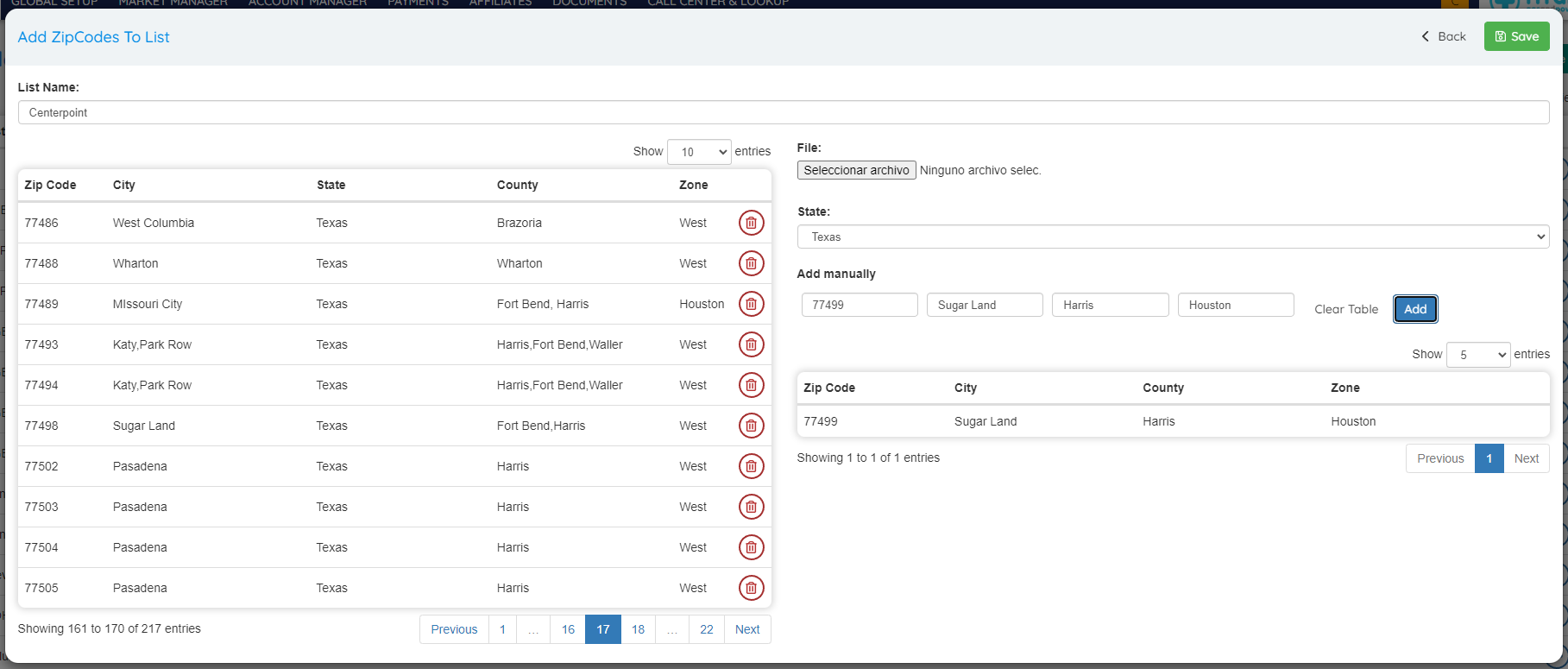
Once a zip code is added to a List, the next and last step is to associate the zip code with the Utility under Utility Manager:
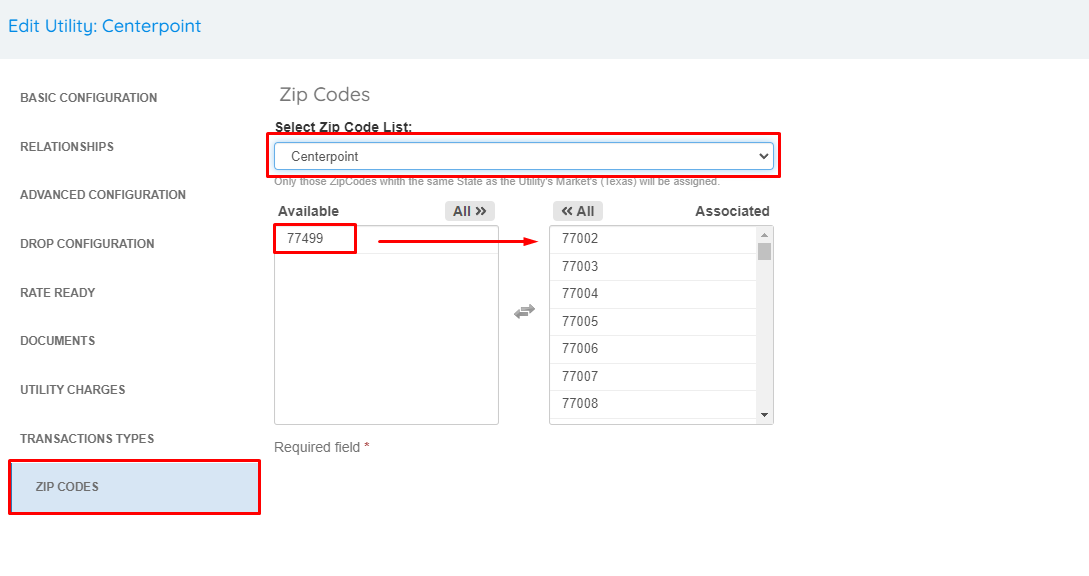
That’s it. it. You are done :) The zip code is now tied to all the plans from the utility without having to update one by one.
Plans Manager UI updated to version 2.0
The Plans Manager UI has been completely revamped and updated to the 2.0 look and feel.
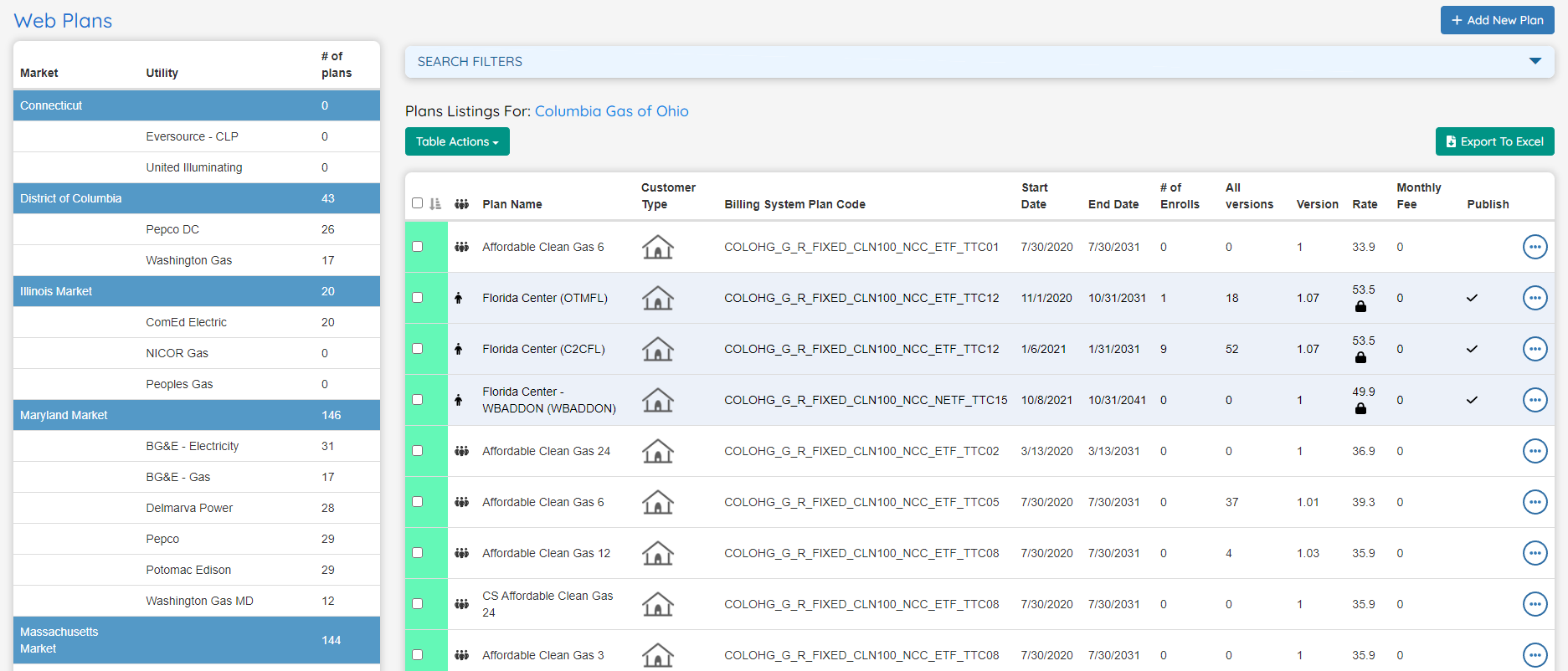
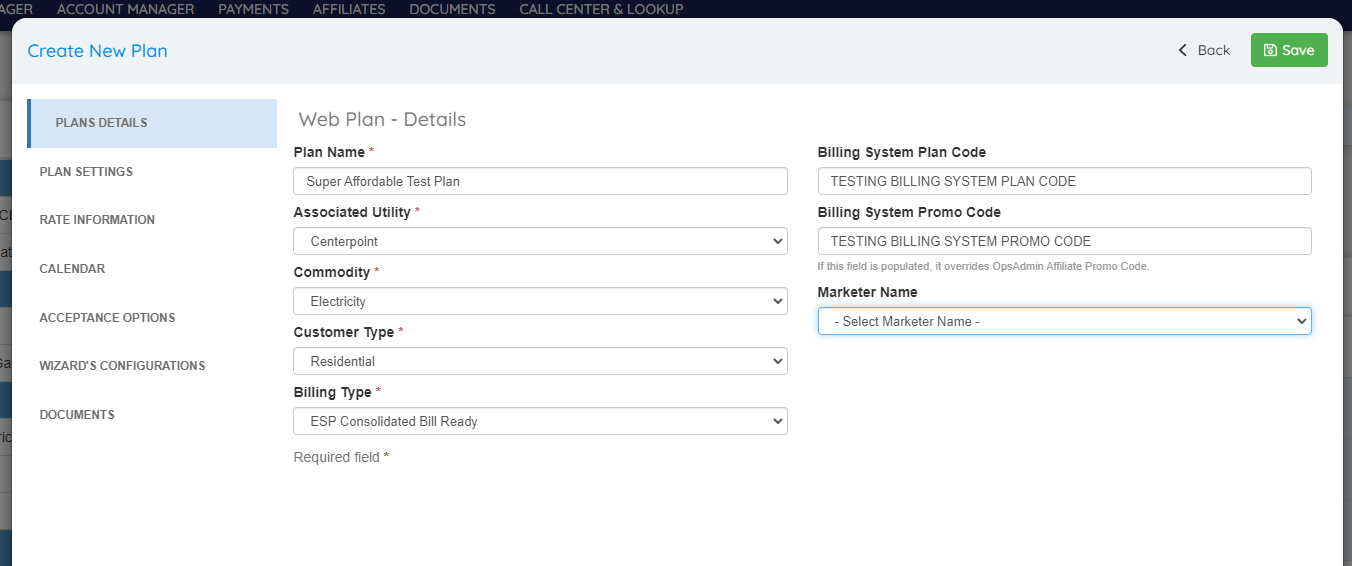
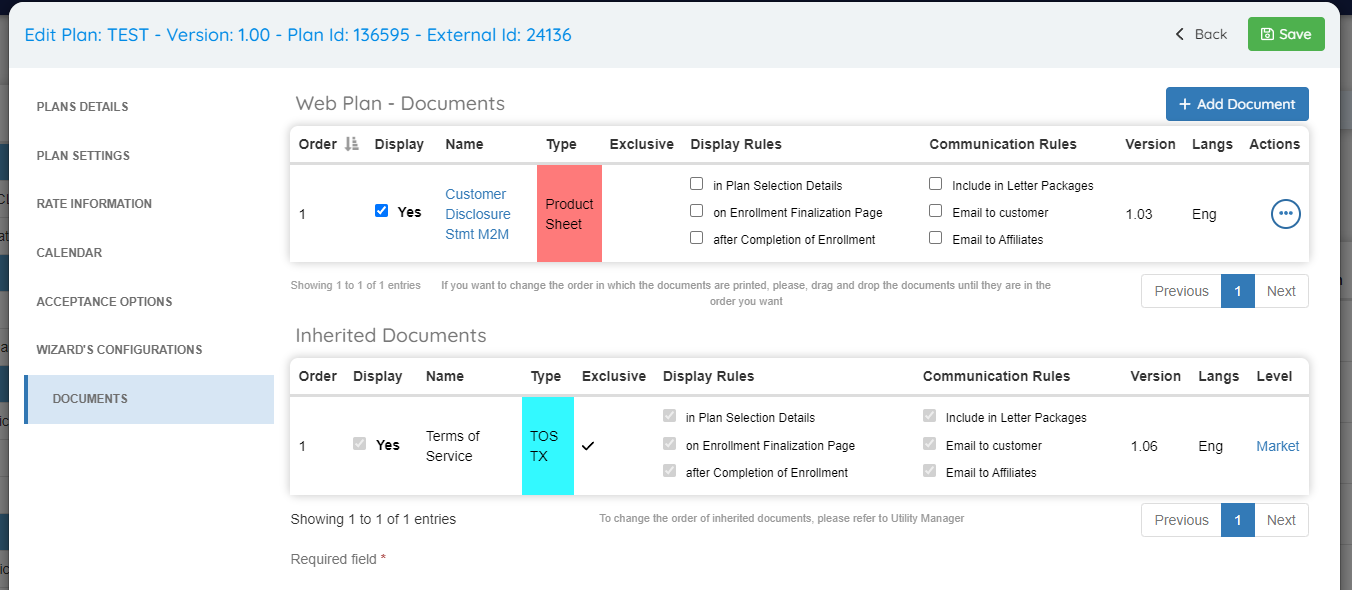
The new UI has mostly the same structure but there are a few key changes worth highlighting. First of all, everything can now be configured when creating the plan instead of saving and opening the plan again to finish the configuration, also the documents configuration is now a section of the edit modal instead of a separate screen accessible from the table:
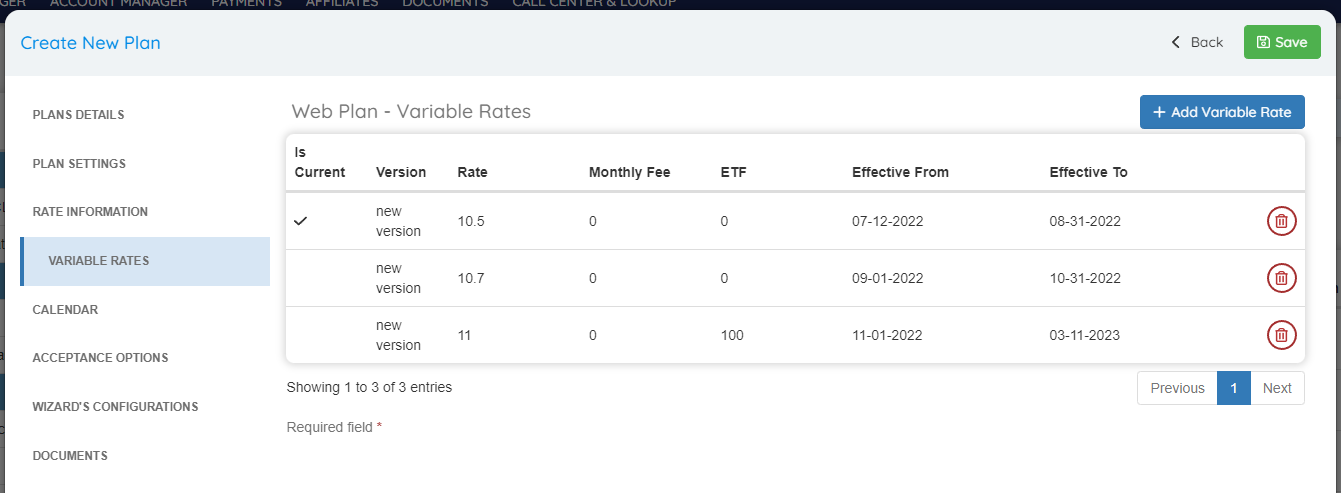
Another change is the variable rates configuration, when that type is selected, a new section will appear in the left bar to configure variable rates:
The plan acceptance values and zip codes configuration has also been changed and it’s further explained in their corresponding items.
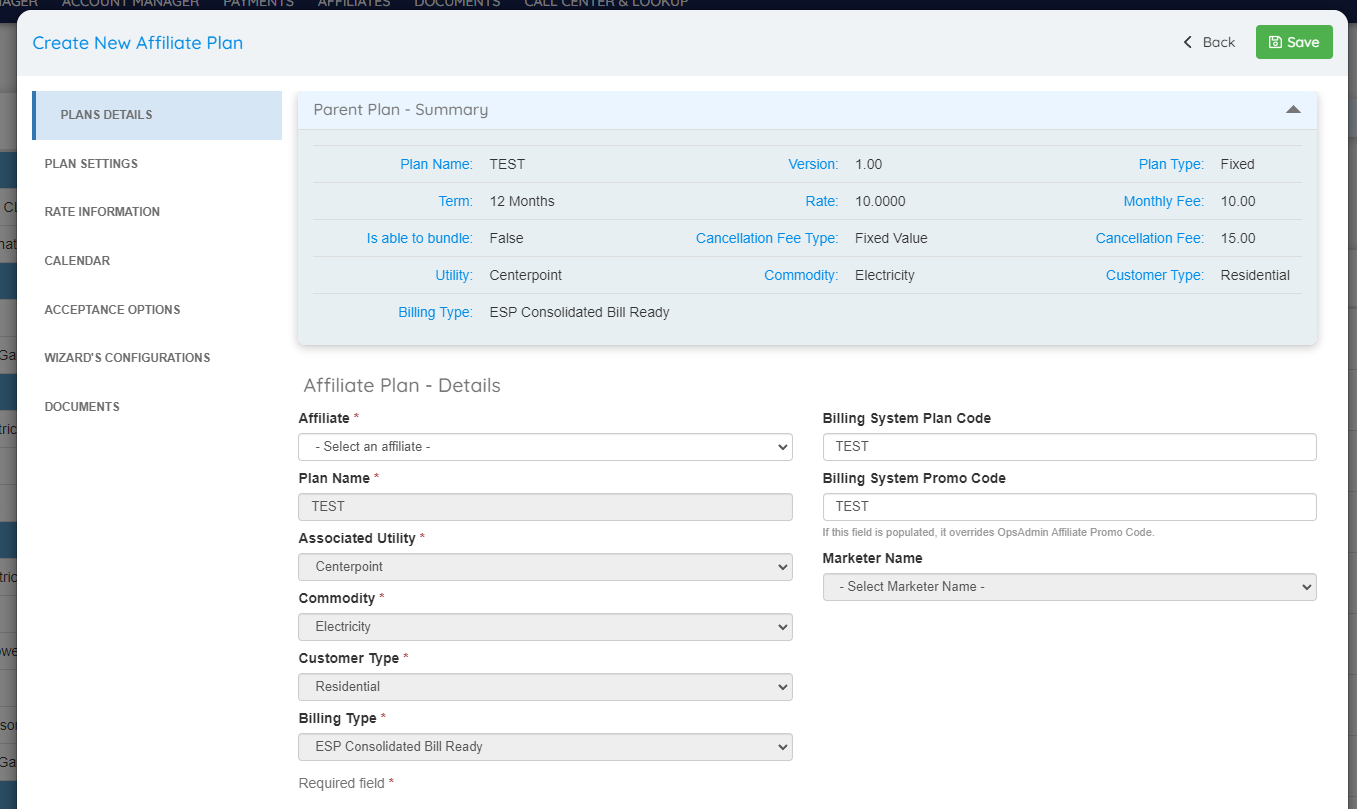
The Affiliate plan pop up now includes all necessary fields to allow even more customization.
Plan Acceptance Options new management plus UI updated to version 2.0
Plan Acceptance Options can now be set up from Types Setup. Being able to manage this independently from plans allows a much more efficient way of assigning, creating, updating and deleting acceptance options.
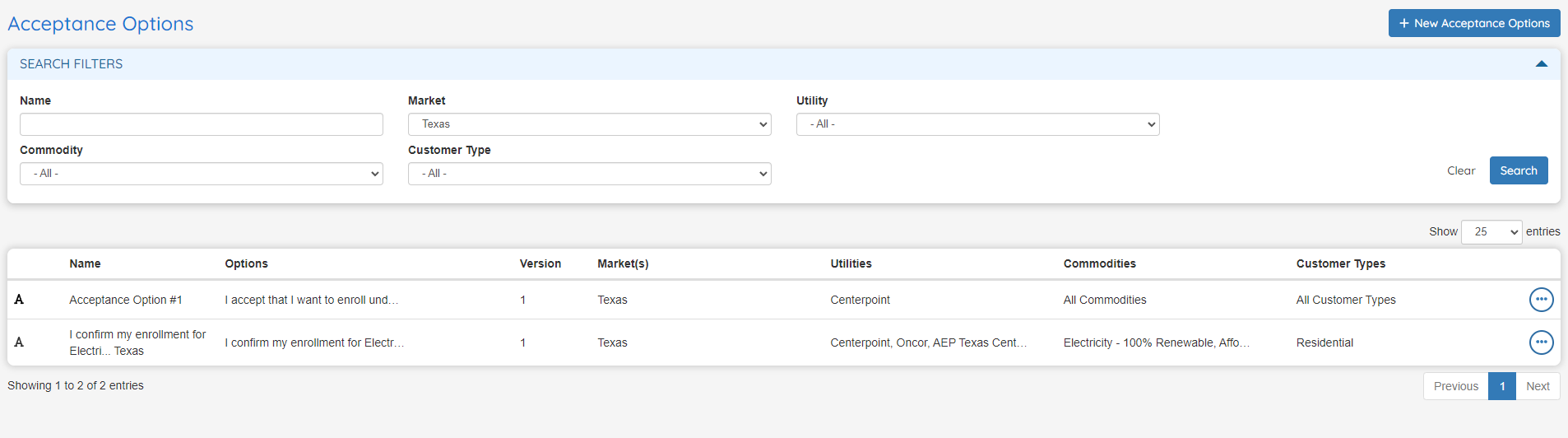
Acceptance Options have their own UI in the system, where the user can search and make global changes to acceptance options without having to do this in each individual plan. If the user needs to add a new acceptance option, it can be massively assigned to multiple plans in one step allowing multiple criteria such as markets, customer types, utilities and commodities.
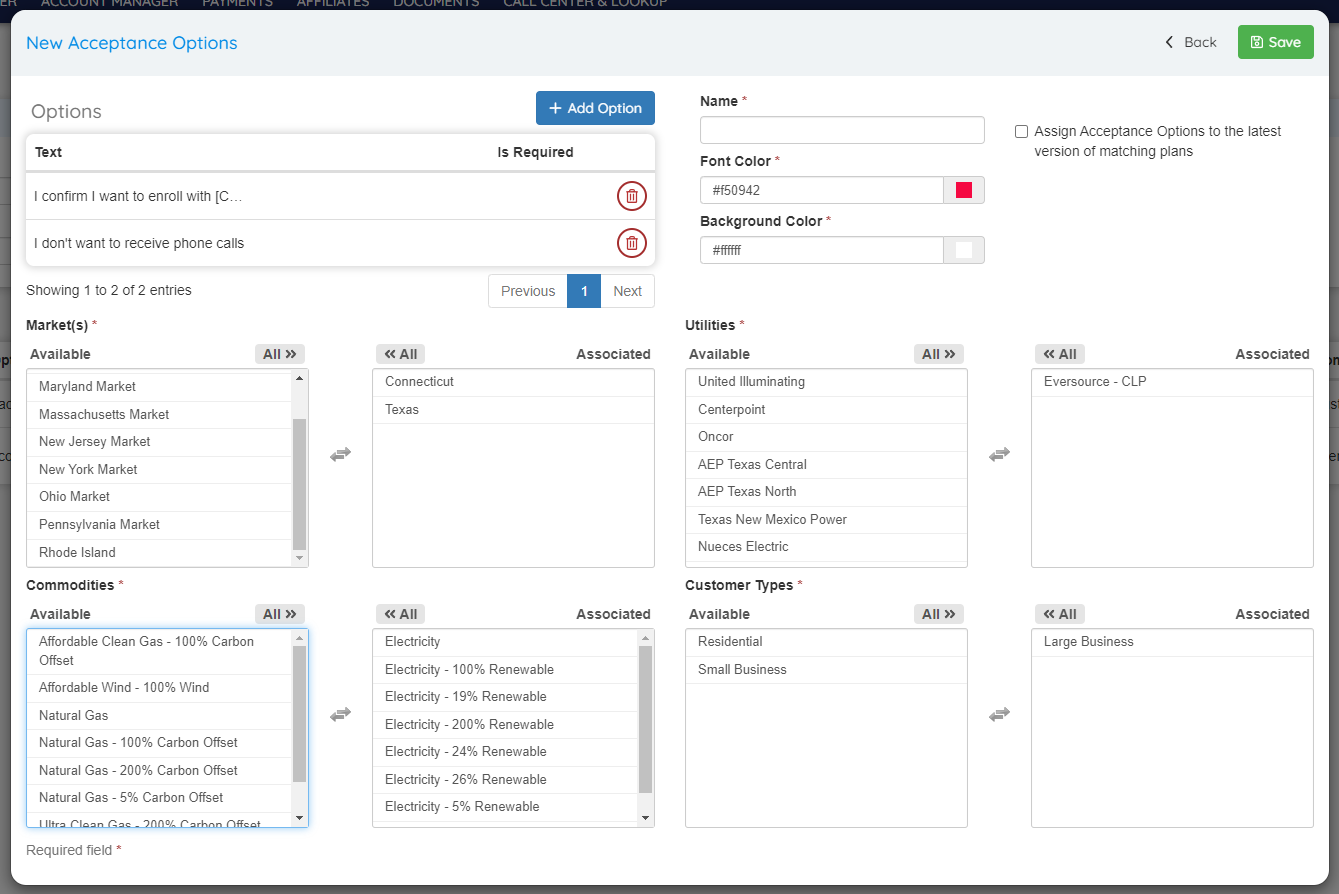
The user can customize the Acceptance options font color and background color. This may be helpful for highlighting an important item when completing the enrollment process.
Replacement values can be included in the acceptance option text:
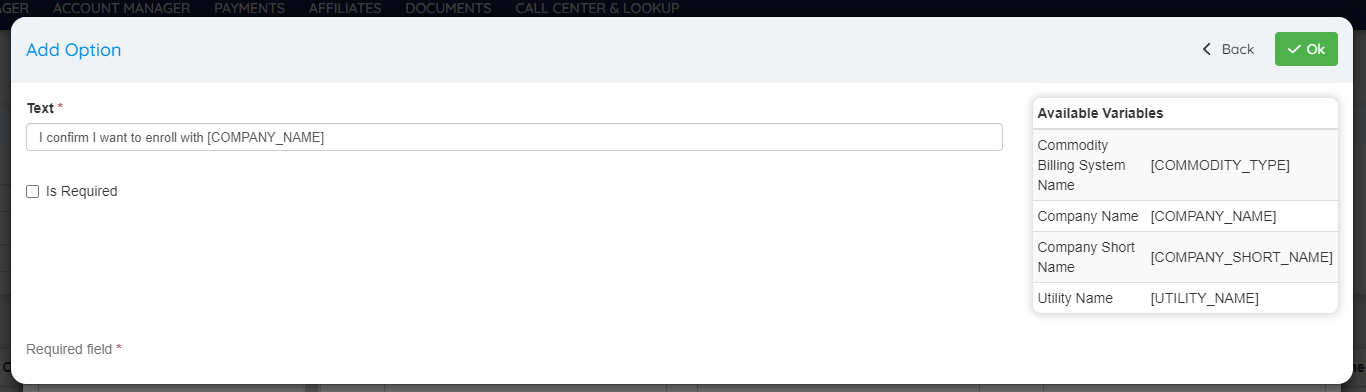
New features:
- Assign acceptance option to the existing matching plans: This checkbox will add the acceptance options to all the plans that belong to the specified Market, Utility, Customer Type and Commodity.
- Update assigned plans: This checkbox will make the specified changes in all the plans that currently use this acceptance option.
- Version History: Users can keep track of changes made to Acceptance Options:

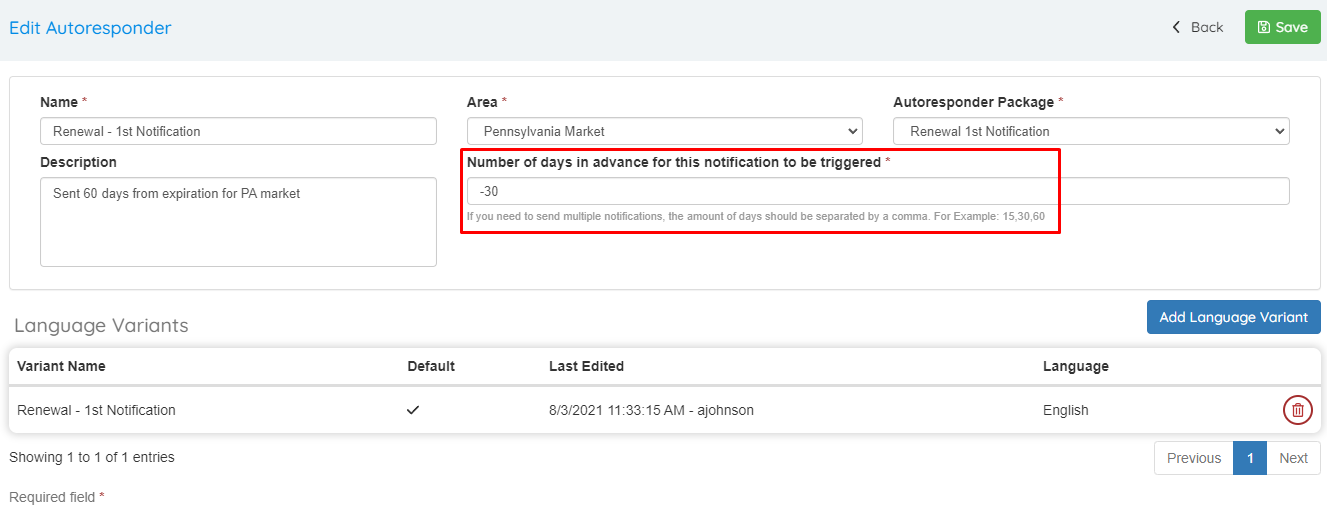
Enhancement to allow a negative amount of days to be used when sending notifications
The field “Number of days in advance for this notification to be triggered” now allows a negative amount of days. This means that this autoresponder will trigger a notification a certain amount of days AFTER the account’s contract expiration date. This may be helpful for contacting customers which accounts have expired to make them a new offer.
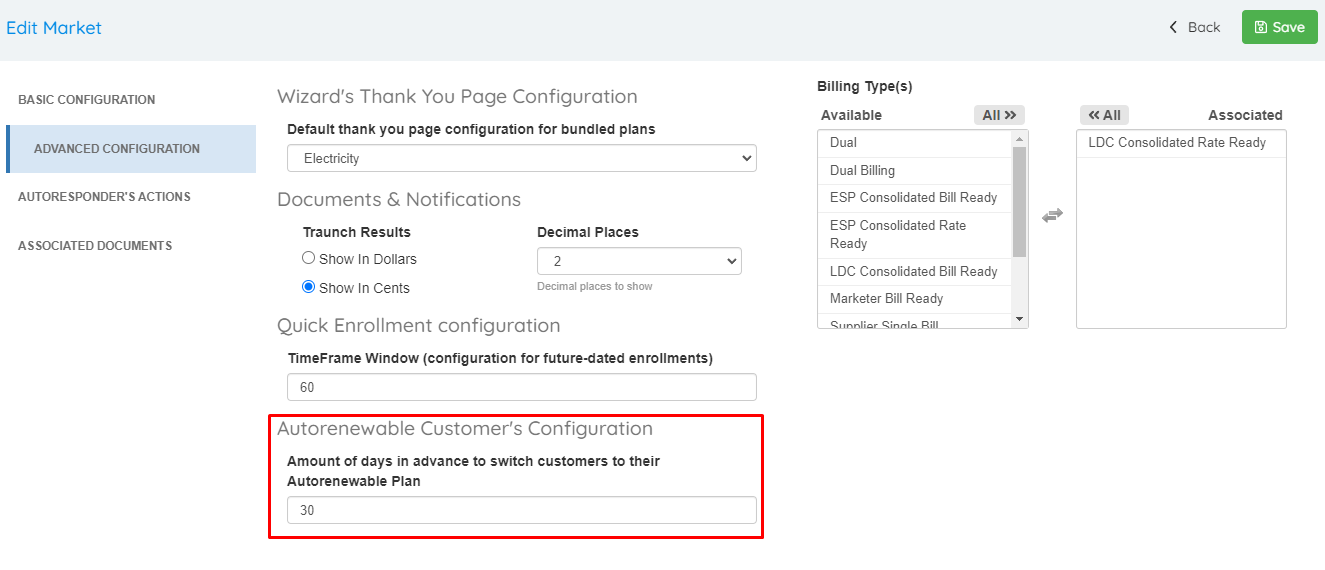
Customize amount of days in advance to switch customers to their next plan when working with Auto renewable Plans
A new setting can be found under Market Manager to customize the exact amount of days required to switch customers to their next plan when working with Autorenewable Plans. This field should be populated for all Markets that currently use Auto renewable plans.
Improvements for User Roles UI and general roles functionality
Starting this release all roles will be reviewed. For this first iteration half of the roles have been reviewed. The remaining roles will be adjusted in the upcoming iteration. They have been renamed with the format “Parent Menu → Screen Name: Action”, being the parent menu only for screens that are in the second level menu. Multiple functionalities that had the incorrect role have been corrected and lots of old unused roles removed which will simplify the process of working with role groups. Also, roles are now alphabetically sorted in the UI. This should make searching and locating roles easier.
We strongly advise reviewing the role groups because after all these corrections, some users may have gained or lost access to some screens/functionalities. A description of the adjustments can be found below.
Updated roles:
- Billing Type “add” and “edit” functionality were using Commodity Types roles instead of Billing Types roles.
- Replaced “Edit Enrollment” role to “Submit Prospect ESG” role for the submission to billing system function in Enrollment Manager.
- Changed “List Enrollments” role to “Import Legacy Importer” role for the legacy importer search and export functionality.
- Changed “List Enrollments” role to “Import Enrollments Call Center” role for the sales importer search functionality.
- Changed “Edit Market” role to “List Market” role for the get actions and get documents in Market Manager.
- Changed “List Plan” role to “Edit Plan” role for the store plan function in Market Manager.
- Changed “List Zipcodes” role to “List Users” role for the get role groups in User Manager.
- Changed “Delete ZipCode” role with “Delete ZipCode List” role for the delete list function.
- Changed the “Zipcode List View” role to “Zipcode View” role for functions to search and export zip codes.
- Changed the “Zipcode View“ role to “Zipcode List View“ role for functions to search and export zip code lists.
- Changed “Sub Menu Plans“ with “List Plans“ for the shortcuts section in the OpsAdmin dashboard.
- Changed “Sub Menu Enrollments“ with “List Enrollments“ for the shortcuts section in the OpsAdmin dashboard.
- Changed “Sub Menu Customer Support“ with “List Customers“ for the shortcuts section in the OpsAdmin dashboard.
- Changed “Sub Menu Drops Cancels“ with “List Drops“ for the shortcuts section in the OpsAdmin dashboard.
- Changed “List Emails“ with “Edit Email Status“ for the Update Status functionality under Email Queue.
- Changed “View Drop Rules“ with “List Drops“ for the Drops Manager, Retention Queue and Winback Queue screens.
Removed roles:
- Removed “Edit Enrollment“ role from Send Test Email functionality in Email Manager.
- Removed “Edit Enrollment“ role from Massive Update Status functionality under Enrollment Manager; the “Massive Status Change“ role is still associated with it.
- Removed “View Plan“ role from Update Checks Document functionality under Plans Manager.
- Removed “Document Delete”, “Edit ZipCodes“, “Delete Plan Types“, “Add Plan Types“, “Send Email Enrollment“, “Sub Menu Enrollments“, “View Plans“, “View Affiliates“, “Sub Menu Affiliates“, “View_Affiliate_Plans“, “Delete_Billing_Types“, “View_Billing_Types“ roles since they were no longer used.
- Removed “Main Menu Global Setup“, “Main Menu Market Manager“, “Main Menu Account Manager“, “Main Menu Marketing Tools“, “Main Menu Call Centers“, “Main Menu Billing Collection“, “Main Menu Report Exports“, “Main Menu Support“, “Main Menu Joomla Content“ and “Main Menu Admin“ roles since they are no longer used. Also, these roles make no sense since menus can be reorganized.
- Removed “Sub Menu System Setup“, “Sub Menu Types Setup“, “Sub Menu Markets“, “Sub Menu Utilities“, “Sub Menu Zip Codes And Grouping“, “Sub Menu Plans“, “Sub Menu Zip Codes Tracking“, “Sub Menu Enrollments“, “Sub Menu Plan Selection Reports“, “Sub Menu Expiring Plan Reports“, “Sub Menu Parser“, “Sub Menu Lookup Tool“, “Sub Menu Enrollment Import“, “Sub Menu Customer Support“, “Edit Customers“, “Sub Menu non web Plans“, “Add AutoresponderType“, “Edit AutoresponderType“, “Delete AutoresponderType“, “List AutoresponderType“, “Sub Menu Customer Support“, “Delete Drop Rules“, “Sub Menu User Manager“, “Receive Notifications“, “List Call Disposition Reasons“, “Edit Call Dispositions Reasons“, “Add Call Disposition Reasons“, “Delete Call Disposition Reasons“, “View Re Enroll“, “Add-Edit Drop Reason Codes“ since all these are either no longer used or redundant with other more narrow roles.
Added roles:
- The existing “Delete Affiliates“ role was not being validated in the corresponding functionality.